

Reputation+


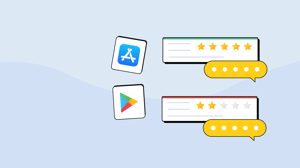
Every unanswered app store review is a missed conversation with both the reviewer and the thousands of prospective users who will read that review before deciding whether to download. Your responses live permanently on your app listing, shaping perception long after the original complaint or compliment.
This guide covers exactly how to reply to reviews on iOS App Stores and Google Play, which reviews to prioritize, best practices for crafting effective responses, and tools that help teams manage high volumes without sacrificing quality.
| Table of content: |
|
What are app store reviews
App store reviews are public feedback from users that appear directly on your iOS App Store or Google Play listing. Each review combines a star rating (1-5) with an optional written comment, and both elements shape how prospective users perceive your app before they hit download.
Here's what makes reviews unique: brands can respond publicly, and those responses are visible to everyone browsing the listing. So when you reply to a single frustrated user, you're also speaking to thousands of potential customers who are deciding whether your app is worth their time.
How to reply to reviews on iOS and Android
The process for replying differs slightly between platforms, though both Apple and Google provide built-in tools. Let's walk through each one.
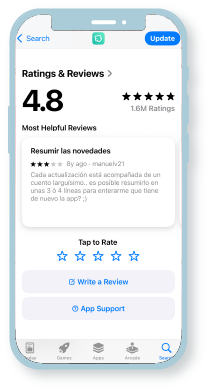
Replying to reviews in App Store Connect
To respond to iOS reviews, you'll work through App Store Connect:
- Log in to App Store Connect and select "My Apps"
- Choose your app, then click "Ratings and Reviews" in the sidebar
- Select the platform (iOS, macOS, visionOS) from the dropdown
- Find the review and click "Reply"
- Enter your response and submit
One thing to note: responses can take up to 24 hours to appear publicly. You'll also need Account Holder, Admin, or Customer Support permissions to reply.
You can edit or remove responses after publishing. Navigate back to the review, and you'll see options to modify or delete your existing reply.
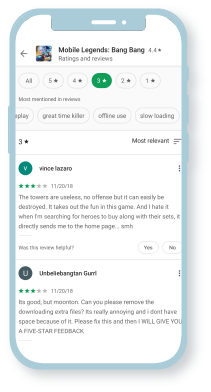
Replying to reviews in Google Play Console
Google Play follows a similar flow, though responses typically appear faster:
- Open Google Play Console and select your app
- Navigate to "Ratings and reviews" under the Quality section
- Locate the review and click the reply icon
- Write your response and click "Publish reply"
To edit or delete a previously published reply, navigate back to the review and select the appropriate option. The original reviewer receives a notification when you respond or update your response. Google Play also offers filtering by rating, country, and app version, which helps when you're trying to prioritize which reviews to tackle first.
Replying to reviews using a tool like BrandBastion
Native tools (App Store Connect and Google Play Console) are fine when you have a trickle of reviews. Once volume grows, they turn into two separate inboxes, two sets of filters, and a lot of context-switching.
A review management tool like BrandBastion pulls your Apple and Google reviews into one place, so your team can work from a single queue. Instead of jumping between consoles, you can triage, respond, and track progress in one workflow.
Why responding to app store reviews matters
Review responses do more than resolve individual complaints. They shape how your brand appears to every prospective user who scrolls through your listing.
Builds user trust and transparency
When users see that a developer actively responds to feedback, it signals attentiveness. Prospective downloaders notice this, and it often influences their decision before they even try the app.
Increases retention and loyalty
Users who receive a thoughtful response are more likely to update their review positively. A simple acknowledgment can transform frustration into goodwill, which often translates into continued usage.
Impacts app store rankings and ASO
Both Apple and Google factor engagement signals into their algorithms. Active review management can positively influence your app's visibility in search results, making responses part of your broader app store optimization (ASO) approach.
Shapes public perception for prospective users
New users almost always read reviews before downloading. A well-handled negative review, complete with a helpful response, can actually increase conversions by demonstrating that your team is responsive and committed to solving problems.
Provides valuable product and marketing insights
Reviews reveal bugs, feature requests, and the exact language your users employ. This feedback can inform your product roadmap and even provide keyword ideas for custom product pages.
Turns negative experiences into positive outcomes
A thoughtful response to a complaint can convert a frustrated user into a loyal advocate. Many users are willing to update their star rating after receiving a helpful reply that resolves their issue.
Which reviews you should respond to first
While responding to every review is ideal, teams with limited resources benefit from a clear prioritization framework:
- Negative reviews (1-2 stars): Address first because they impact perception and rankings the most
- Reviews mentioning bugs or issues: Technical problems deserve quick acknowledgment
- Reviews with questions: Users expect answers and may update their ratings after receiving help
- Recent reviews: Timeliness matters for user satisfaction
- Detailed constructive feedback: Responding demonstrates that you value thoughtful input
- Positive reviews from engaged users: Thanking loyal fans encourages advocacy
This approach helps teams maintain an effective response cadence without burning out.
Best practices for responding to app store reviews
The following practices apply across both iOS and Android. Each tip is designed to be immediately actionable.
1. Respond quickly and consistently
Aim to reply within 72 hours. Setting up a regular review monitoring cadence prevents backlogs from forming. Delayed responses can signal disengagement to users who are waiting for help.
2. Prioritize negative reviews
Negative reviews have the highest impact on your app's conversion rate. Addressing concerns promptly prevents reputational damage and demonstrates accountability to both the reviewer and prospective users.
3. Personalize each response
Use the reviewer's name if available and reference specific details from their feedback. Generic, templated language feels automated and often backfires, making users feel like their concerns weren't actually heard.
4. Maintain a consistent brand voice
Your responses reflect your brand's established tone, whether friendly, professional, or playful. Creating response guidelines as starting points helps, though they work best when customized for each situation.
5. Apologize and acknowledge issues genuinely
A sincere apology goes a long way. Avoid defensive language or excuses, and validate the user's frustration before offering a solution.
6. Explain what actions you have taken or plan to take
Be specific. Tell users what you did to fix their issue or when a fix is coming in a future update. Vague promises erode trust, while specificity builds credibility.
7. Provide helpful resources and next steps
When relevant, link to FAQs, help documentation, or your support channels. Give users a clear path to resolution rather than leaving them to figure it out on their own.
8. Keep responses concise and clear
Avoid long paragraphs. Get to the point quickly, as users appreciate brevity, especially when reading on mobile devices.
9. Move sensitive conversations to private channels
For issues requiring account details or personal information, invite the user to contact support directly. Never ask for private data in a public response.
10. Follow up after resolving issues
If you fix a bug or implement a feature that a user mentioned, consider replying again to let them know. This extra step often prompts users to update their rating.
Response templates for common scenarios
|
Scenario
|
Suggested Approach
|
Key Elements
|
|
⚠️ Bug report
|
Acknowledge, apologize, request details
|
Empathy, next steps, contact option
|
|
🖊️ Feature request
|
Thank the user, note the feedback
|
Appreciation, confirmation it's logged
|
|
💙 General praise
|
Express gratitude
|
Warmth, invitation to share
|
|
😠 Frustrated user
|
Apologize, offer support channel
|
Empathy, resolution path
|
|
❌ Spam or irrelevant
|
Report the review, do not engage
|
N/A
|
Mistakes to avoid when replying to app store reviews
Even well-intentioned responses can backfire. Here are the most common pitfalls.
Ignoring negative reviews
Silence signals indifference. An unanswered complaint sits on your listing for every prospective user to see, and the absence of a response often speaks louder than a poor one.
Overusing generic or canned responses
When every reply looks identical, users notice. Repetitive templates feel robotic and suggest you're going through the motions rather than genuinely engaging with feedback.
Being defensive or argumentative
Even when criticism feels unfair, defensive responses reflect poorly on your brand. The goal is resolution, not winning an argument in a public forum where everyone can watch.
Making promises you cannot deliver
Avoid committing to features or timelines you can't guarantee. Broken promises generate follow-up complaints and damage credibility more than the original issue ever did.
Overlooking language and cultural differences
Global apps receive reviews in multiple languages. What sounds helpful in one culture might seem dismissive in another, so consider tone and context when responding to international users.
Tools and workflows for managing app store reviews
Manual review management works fine when you're getting a handful of reviews each week. Once volume increases, you'll want systems that help you respond efficiently without sacrificing quality.
Native platform tools
App Store Connect and Google Play Console are free and built into each platform. They work well for low-volume apps but lack features like team collaboration, cross-platform management, and detailed analytics.
Review management platforms
Third-party tools like BrandBastion or AppFollow aggregate reviews from both app stores into a single dashboard. They enable team workflows, provide sentiment analytics, and help you spot trends across your review history.
How to scale your app store review responses
Responding to hundreds or thousands of reviews requires more than faster typing. Here are tactics that help teams manage volume without sacrificing quality:
- Batch approval workflows: Review and approve multiple AI-drafted responses at once instead of writing each one individually
- Response templates with personalization fields: Create base templates that include dynamic fields for names and specific issue details
- Prioritization rules: Set criteria for which reviews require human attention versus automated handling
- Team routing: Assign different review categories to appropriate team members, such as support issues versus feature requests
- Sentiment-based alerts: Get notified when negative review volume spikes so you can respond proactively
Platforms like BrandBastion enable teams to clear large response queues efficiently. One person can approve hundreds of contextual, on-brand replies in the time it would take to write a dozen manually.
Turn every app store review into a growth opportunity
App store reviews are critical engagement touchpoints that influence acquisition, retention, and brand perception. Consistent, thoughtful responses differentiate brands in competitive marketplaces.
As review volumes scale, teams benefit from efficient workflows that maintain response quality. BrandBastion helps brands manage high-volume review responses across app stores and social platforms with AI-powered drafts and centralized moderation, turning review management from a burden into a competitive advantage.