

Reputation+


App review management turns scattered user opinions into actionable insights, and when done well, it directly impacts your star rating, search visibility, and download conversions.
According to Alchemer’s research, a one-star difference in your app rating can shift conversion rates by double digits. In this guide, you’ll learn what app review management involves, why it directly impacts your app store rankings, and how to build a strategy that scales without overwhelming your team.
| Table of content: |
What is app review management
App review management is the process of monitoring, analyzing, and responding to user feedback on app stores like the Apple App Store and Google Play. It covers everything from tracking sentiment or the overall star rating, engaging with users, and turning negative feedback into opportunities to improve both your product and your reputation.
Think of it this way: every review is a conversation starter. When someone takes the time to write about their experience, they're giving you direct insight into what's working and what isn't. Review management is how you make sure those conversations don't go unanswered.
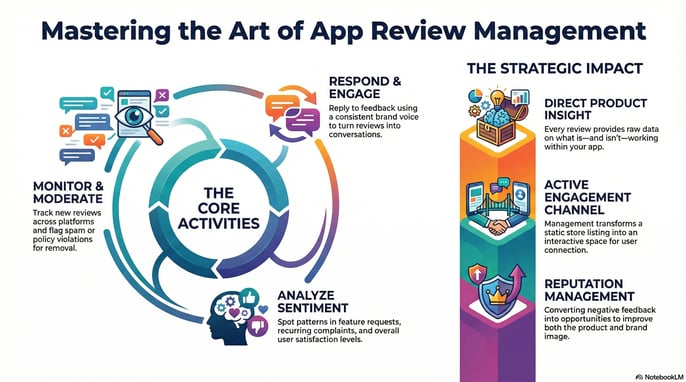
The process typically involves four core activities:
- Monitoring: Tracking new reviews across platforms so nothing slips through.
- Responding: Replying to feedback in a way that reflects your brand voice.
- Analyzing: Spotting patterns in sentiment, feature requests, and recurring complaints.
- Moderating: Flagging spam, fake reviews, and policy violations for removal.
When done well, app review management transforms your app store listing from a static page into an active engagement channel.
Why app review management matters for your brand
Reviews influence download decisions
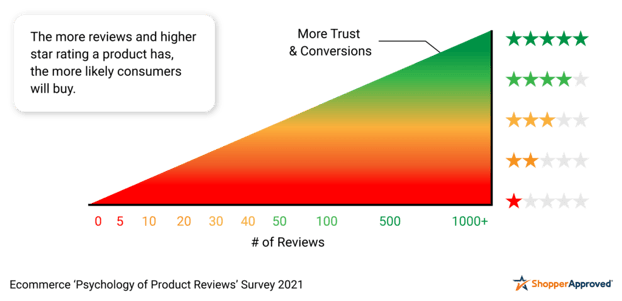
Before someone downloads your app, they almost always check the reviews first. This is social proof at work, users want to know what others experienced before they commit. A handful of negative reviews sitting unanswered at the top of your listing can turn potential users away. On the other hand, a well-managed review section with thoughtful responses signals that your brand pays attention. Learn more about the impact of responding to app reviews on ratings and growth here.
74% of consumers check at least two review sites before making decisions.
(Local Consumer Review Survey, Brightlocal)
Reviews shape brand trust and credibility
Public reviews create lasting impressions. When someone sees a negative review with no response, they often assume the brand doesn't care, or that the complaint is valid and unresolved. A professional, empathetic reply can actually turn a negative review into a trust-building moment.
89% of consumers expect business owners to respond to all types of reviews.
(Local Consumer Review Survey, Brightlocal)
Reviews deliver direct product feedback
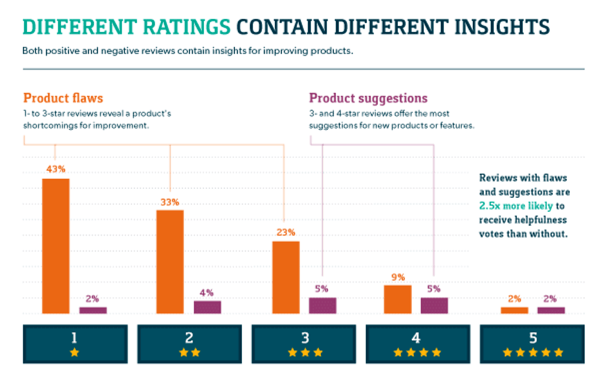
Your users are telling you exactly what they want, for free. Reviews surface bugs your QA team missed, features your competitors have that you don't, and friction points in your onboarding flow. Treating reviews as a research channel gives you a direct line to user sentiment that analytics dashboards can't fully capture.
Popular apps can receive ~4,000 reviews per day, and research suggests ~30% of user comments express requirements (e.g., feature requests or problem reports).
(Springer)
Core components of an app review management strategy
Monitor and centralize
Real-time tracking of new reviews across all app store platforms is the foundation. Without visibility into what users are saying, you can't respond, analyze, or act. Most teams use dedicated tools to aggregate reviews from both the Apple App Store and Google Play into a single dashboard to reduce missed issues, speed up response time, and make it easier to spot spikes tied to a specific app version, country, or language.
Review response workflows
Replying to reviews, both positive and negative, shows users you're listening. It also signals to potential users that your brand is engaged. The goal is to acknowledge feedback, address concerns, and reinforce positive experiences.
Sentiment analysis
Sentiment analysis categorizes reviews by tone (positive, negative, neutral) to help you spot trends. Are users suddenly frustrated after a recent update? Is a new feature generating excitement? Sentiment tracking surfaces patterns before they become crises.
Moderation and spam removal
Spam, fake reviews, and policy-violating content can clutter your review section and mislead potential users. Both app stores have reporting mechanisms, but you have to actively flag violations to get them removed.
Reporting and insights
Review data becomes most valuable when aggregated into reports that inform decisions. Track metrics over time, share insights with product teams, and use review trends to guide your roadmap.
Best practices for managing app store reviews
1. Respond to reviews promptly and consistently
Set internal SLAs for response time. Many brands aim for 72 hours, though faster is better for negative reviews where users are actively frustrated.
Consistency matters as much as speed. Users notice when some reviews get responses and others don't, and it can feel arbitrary or unfair.
2. Personalize responses while maintaining brand voice
Avoid generic copy-paste replies. Reference specific feedback from the user's review to show you've actually read what they wrote.
Templates can serve as starting points, but the final response works best when it feels human and relevant to the individual's experience. A response that says "We're sorry you experienced a crash when adding to the cart" lands better than "We're sorry for any inconvenience."
3. Prioritize negative reviews for quick resolution
Address complaints and critical feedback first. This approach helps prevent churn, mitigates negative sentiment, and demonstrates accountability to both the reviewer and anyone else reading.
When you resolve an issue, ask the user to consider updating their review. Many will—and updated reviews carry weight with both algorithms and future users.
4. Use review insights to inform product decisions
Share recurring themes, bug reports, and feature requests with your product and CX teams. Reviews often surface issues faster than internal testing because users encounter edge cases your QA team might miss.
When an issue is fixed based on feedback, close the loop publicly. Reply to relevant reviews, letting users know their input led to a change—this builds goodwill and encourages future feedback.
5. Monitor for fake reviews and spam
Watch for suspicious patterns like review bombing or coordinated attacks. Competitors or bad actors sometimes attempt to artificially deflate ratings, and catching this early matters.
Use the app stores themselves to report and remove fraudulent activity.
Key metrics for measuring app store review management success
Tracking the right metrics helps you understand whether your efforts are working. Here are the ones that matter most:
- Average star rating: Your most visible metric to potential users and a primary factor in download decisions.
- Review volume and velocity: The total number of reviews and the rate at which new ones arrive. Sudden drops may signal issues worth investigating.
- Response rate and response time: Aim for 100% response rate and sub-48-hour response times.
- Sentiment distribution: The breakdown of positive, negative, and neutral reviews over a given period helps you spot trends early.
- Rating trends over time: Track whether your rating is improving, declining, or stable across app versions and campaigns.
How star ratings affect conversion rates
Your star rating is often the first thing users see when they find your app. It acts as social proof, guiding decisions before someone even reads a single review.
Here's how different ratings typically affect user perception:
| Star Rating | Typical User Perception |
| 4.5+ stars | High trust, likely to download |
| 4.0–4.4 stars | Generally positive, may read reviews |
| 3.5–3.9 stars | Hesitant, will scrutinize feedback |
| Below 3.5 stars | Significant trust barrier |
Even small improvements in your average rating can meaningfully impact download rates. Moving from 3 stars to 4 stars, for instance, can substantially increase conversions.
How to integrate app reviews with social engagement management
Reviews are one channel among many where users share feedback. Managing them alongside social comments, DMs, and mentions creates a unified view of customer sentiment rather than fragmented insights scattered across platforms.
Rather than juggling separate tools for each channel, look for platforms that centralize all engagement in one place. This approach helps teams respond faster and spot cross-channel patterns that might otherwise go unnoticed, like a bug that users mention in both app reviews and X replies.
BrandBastion, for example, supports Instagram, Facebook, TikTok, YouTube, Trustpilot, Google Reviews, and app stores (Apple Store and Google Play Store). This coverage spans both organic and paid content as well as earned mentions, giving brands a complete picture of what their audience is saying.