

Reputation+


Responding to reviews drives growth in three ways: it brings unhappy users back (increasing the chance they update their rating), it adds visible reassurance next to critical reviews (improving conversion on your listing), and it strengthens the rating/recency signals app stores use to rank apps (supporting ASO visibility).
This guide breaks down exactly how review responses influence ratings and conversions, plus the best practices that help teams respond efficiently as volume scales.
What happens when you reply to an app review
Replying to reviews is one of the simplest ways to lift your app’s star rating. Here's why: when you respond to a review, the app store notifies the user and brings them back to the original review, where they can edit both the text and the star rating. A frustrated user who left a 1-star review might reconsider and update it after feeling acknowledged. Google reports that responding to a negative review can increase that rating by an average of +0.7 stars, which is a meaningful lift when users are deciding whether to download your app.
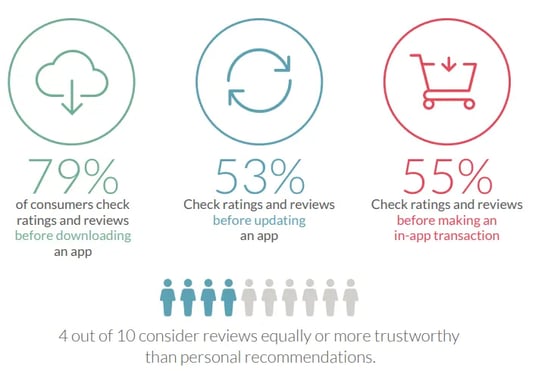
The visibility matters too. 79% of users check reviews and ratings before downloading an app. When a highly visible review such as “Most Helpful” or "top voted" appears near the top, your response shows right next to it. That makes replying to those reviews especially valuable because you are not only addressing one customer, you are reassuring every potential customer who is reading.
 Source: Apptentive
Why do users update their ratings after a developer response
When someone leaves a frustrated review and gets a thoughtful response, something shifts. The app goes from feeling like a faceless product to something with real people behind it.
A few things drive rating updates:
- Acknowledgment: Users feel recognized as individuals, not ticket numbers
- Resolution: When the reported problem actually gets fixed, users have a concrete reason to change their mind
- Perception shift: A helpful response signals the app is actively maintained and supported
Even when you can't solve someone's issue right away, responding often diffuses the frustration. That emotional shift, from feeling ignored to feeling heard, frequently translates into a higher rating.
How replying to reviews affects app store ratings and the app's visibility (ASO)
Ratings and reviews influence both conversion and visibility. Higher ratings tend to improve store listing conversion (more people install after viewing your page). More installs can lead to more reviews, and more positive reviews help your rating stay high, reinforcing both performance and discoverability.
Responding to reviews is one of the few actions that kick off this cycle without requiring additional ad spend. When you reply, the reviewer is prompted to revisit their review, and that revisit creates an opportunity for the rating to change. That rating lift can compound over time through better conversion and stronger discoverability.
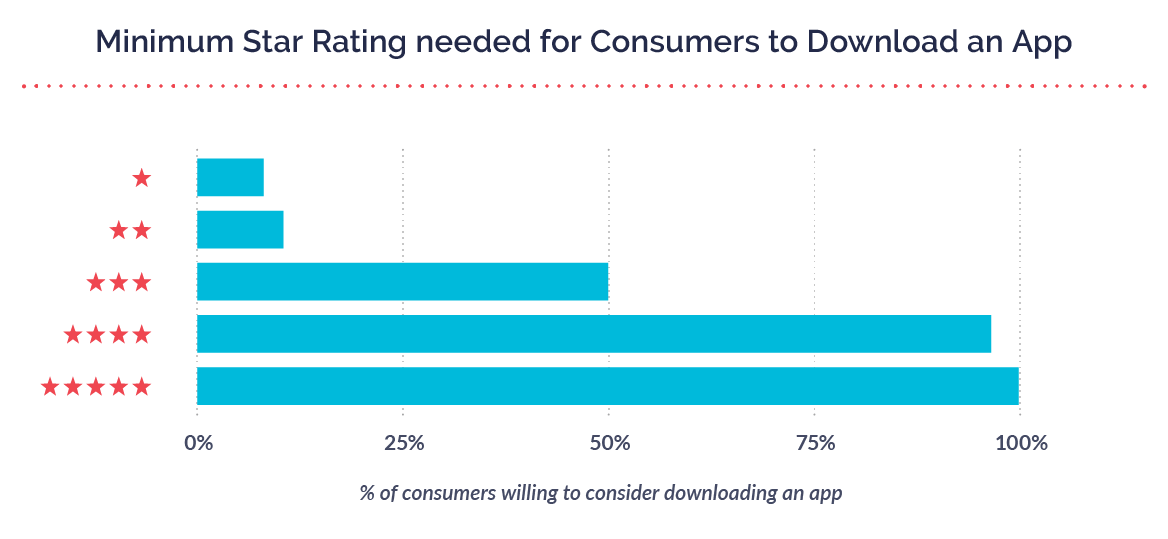
| ⭐ 90% of customers consider star ratings as an essential part of their evaluation of an app. |
The reply effect: where rating lift actually comes from
There is a consistent pattern across apps: when developers reply, users are more likely to revisit and update their rating. This is why focusing on negative reviews often produces the biggest lift. Turning a 1-star review into a higher rating has a much larger impact than replying to a 5-star review that is unlikely to change.
Research from Appbot shows that roughly 18% of 1- and 2-star reviews receive responses, compared to about 9% of 4- and 5-star reviews.
Ratings, recency, and ranking signals in Apple and Google
App Store Optimization (ASO) is the practice of improving your app's visibility in store search results. Review engagement plays a real role in how both Apple and Google decide which apps to surface.
-
Google Play explicitly encourages developers to respond to reviews and shares guidance that connects responses to measurable rating improvements.
-
Apple's App Store does not disclose a formula, but ratings, recency, and trust signals still shape how users decide to install and how competitive your listing looks.
In other words: responses help lift ratings, and stronger ratings help you rank and convert.
Conversion rate gains from visible developer responses
When users browse your app store listing, they see your responses right alongside user reviews. This visibility influences whether someone goes from viewing your page to actually downloading.
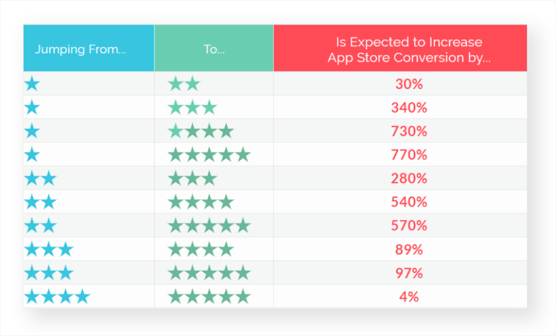
A small difference in the average rating can significantly affect conversion rates. Apps hovering around 4.5 stars convert meaningfully better than those at 4.0, and consistent review responses help push that number upward.
Source: Asodesk
Why responding to app reviews matters for your brand
The rating boost is just the starting point. Review responses ripple out across your entire business, shaping how potential users see your brand, influencing whether current users stick around, and surfacing insights you might otherwise miss.
Builds trust and credibility with users
When users scroll through your review section and see active developer responses, especially to complaints, it signals that your team pays attention and cares about user experience.
Here's something counterintuitive: a negative review paired with a professional, helpful response often leaves a better impression than no negative reviews at all. It shows you handle problems well.
Increases retention and lifetime value
Users who feel supported tend to stick around longer. When someone hits a bug or gets confused and receives a helpful response, they're more likely to keep using the app rather than switching to a competitor.
The math is straightforward: even a small reduction in churn compounds into meaningful lifetime value gains over months and years.
Signals active development to prospective downloaders
An app with recent developer responses looks alive. An app with months of unanswered reviews looks abandoned. Prospective users notice this difference, even if they don't consciously think about it.
Regular response activity shows that your team is engaged, the product is being maintained, and help exists if something goes wrong.
Creates a product feedback loop
Reviews often surface issues that don't show up in support tickets or analytics. Users mention bugs, request features, and describe use cases you might never have anticipated.
Responding to reviews does double duty: it addresses the individual user's concern while also flagging patterns for your product team to investigate.
Best practices to maximize review response impact
Not every response produces the same result. How you reply determines whether users feel motivated to update their rating or simply ignore your message.
1. Personalize every response with context
Reference specific details from the user's review. If they mentioned a crash during checkout, acknowledge that exact issue. Generic responses like "Thanks for your feedback!" rarely prompt rating changes because they feel automated.
2. Prioritize recent negative reviews first
Fresh negative reviews offer the highest potential for improvement. Users are more likely to update their rating when the frustrating experience is still top of mind. A helpful response within 72 hours catches them before they've moved on.
3. Keep responses concise and professional
Three to four sentences typically work well. Acknowledge the issue, provide a clear next step or resolution, and thank the user. Long explanations or defensive language tend to backfire.
4. Respond across all languages and regions
Global apps receive reviews in dozens of languages. Users expect responses in their native language, and ignoring non-English reviews leaves a significant impact untapped. Multilingual response capabilities, whether through team members or AI tools, expand your reach considerably.
5. Acknowledge product updates and fixes
When you've addressed a reported bug in an update, reply to relevant reviews, inviting users to try again. This directly prompts re-evaluation and often results in updated ratings.
6. Use reviews as a source of product insight
Beyond the rating impact, reviews reveal feature requests, usability issues, and competitive gaps. Systematic review analysis informs product decisions and helps prioritize your roadmap based on actual user feedback rather than assumptions.
Mistakes to avoid when responding to app reviews
Certain response behaviors reduce or completely negate the positive impact of engaging with reviews.
Arguing or getting defensive with users
Even if the user is wrong, other potential customers are watching. Defensive responses damage your brand perception publicly. Staying professional and solution-oriented tends to produce better outcomes.
Using generic copy-paste responses
Users recognize recycled templates. When every response looks identical, it signals that you're going through the motions rather than genuinely engaging. Personalization matters more than speed.
Overpromising fixes you cannot deliver
Making commitments you can't keep erodes trust. If a user discovers the issue persists after you promised a fix, they may update their review to be even more negative than before.
Ignoring positive reviews entirely
Responding only to complaints misses an opportunity. Thanking users who leave positive reviews reinforces their loyalty and encourages them to recommend your app to others.
Letting reviews pile up unanswered
The window for influencing a rating update shrinks over time. A response to a six-month-old review is less likely to prompt action than one sent within days of the original post.
Managing app reviews at scale
The most common challenges
For apps with significant download volumes, manual review management quickly becomes unsustainable. The math simply doesn't work when you're receiving hundreds or thousands of reviews monthly.
- High review volume: Popular apps receive thousands of reviews each month, making individual responses time-consuming for small teams.
- Multilingual complexity: Responding authentically in dozens of languages requires either native speakers or intelligent translation tools.
- Tone inconsistency: Multiple team members responding differently creates a disjointed brand experience.
- Slow response times: Manual workflows create backlogs that diminish the rating-change potential of each response.
- Repetitive questions: Answering the same issues repeatedly leads to burnout and lower-quality responses over time.
These challenges explain why many teams struggle to realize the full impact of review responses, even when they understand the value.
How AI improves app review response performance
AI-powered tools address scale challenges while maintaining response quality. Solutions like BrandBastion analyze review context, including the original complaint and your app's features, to generate accurate, on-brand responses that teams can review before publishing.
- Context-aware drafting: AI reads the full review and generates relevant, specific responses rather than generic templates
- Brand voice consistency: Responses follow configured tone and messaging guidelines across all team members
- Multilingual coverage: Respond in the reviewer's language without translation delays or hiring native speakers
- Sentiment detection: Prioritize responses based on urgency and potential impact on ratings
- Batch approval: Review and approve multiple responses simultaneously, clearing high volumes efficiently
The combination of AI drafting and human oversight ensures responses feel personal while operating at scale. Teams can focus on complex cases while routine engagement happens more efficiently.
How to measure the impact of your review responses
Tracking the right metrics helps you understand whether your response approach is working and where to adjust.
Track average rating changes over time
Monitor your overall app rating before and after implementing a response approach. Look for upward trends that correlate with increased response activity. Even small improvements, like moving from 4.1 to 4.3 stars, can meaningfully affect conversion rates.
Monitor review update rates after responses
This is the clearest signal of direct impact. Track how often users modify their reviews following your response. A healthy update rate indicates your responses are resonating with users.
Analyze sentiment shifts by response type
Compare outcomes across different response approaches. Do apologies perform better than explanations? Does offering a direct contact method increase update rates? Sentiment analysis tools help identify what works for your specific audience.
Compare your response rate to competitor apps
Benchmark your responsiveness against competitors to understand your relative engagement level. If competitors respond to 50% of reviews and you respond to 10%, you're leaving competitive advantage untapped.
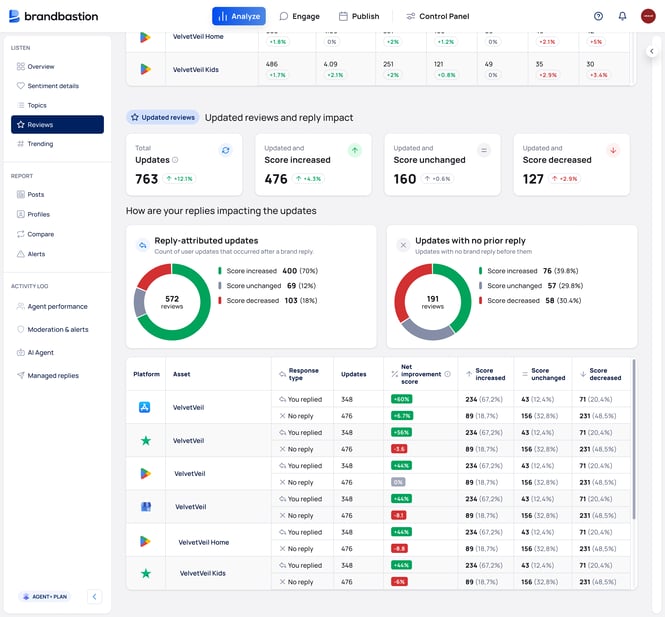 BrandBastion platform
Turn app reviews into a competitive advantage
Review responses are among the most underutilized channels for improving ratings, user sentiment, and app store visibility. Apps that respond consistently see measurable rating improvements, which compound into better rankings and more downloads over time.
For teams ready to maximize the impact of their review responses without adding headcount, AI-powered solutions offer a practical path forward.